from d2l import torch as d2l
import torch
from torch import nn
import os16.1 Sentiment Analysis and the Dataset
With the proliferation of online social media and review platforms, a plethora of opinionated data has been logged, bearing great potential for supporting decision making processes. Sentiment analysis studies people’s sentiments in their produced text, such as product reviews, blog comments, and forum discussions. It enjoys wide applications to fields as diverse as politics (e.g., analysis of public sentiments towards policies), finance (e.g., analysis of sentiments of the market), and marketing (e.g., product research and brand management).
Since sentiments can be categorized as discrete polarities or scales (e.g., positive and negative), we can consider sentiment analysis as a text classification task, which transforms a varying-length text sequence into a fixed-length text category. In this chapter, we will use Stanford’s large movie review dataset for sentiment analysis. It consists of a training set and a testing set, each containing 25000 movie reviews downloaded from IMDb. In both datasets, there are an equal number of “positive” and “negative” labels, indicating different sentiment polarities.
from d2l import jax as d2l
import jax
from jax import numpy as jnp
from flax import linen as nn
import optax
import numpy as np
import os
from d2l import mxnet as d2l
from mxnet import np, npx
import os
npx.set_np()16.1.1 Reading the Dataset
First, download and extract this IMDb review dataset in the path ../data/aclImdb.
d2l.DATA_HUB['aclImdb'] = (d2l.DATA_URL + 'aclImdb_v1.tar.gz',
                          '01ada507287d82875905620988597833ad4e0903')

data_dir = d2l.download_extract('aclImdb', 'aclImdb')
Next, read the training and test datasets. Each example is a review and its label: 1 for “positive” and 0 for “negative”.
def read_imdb(data_dir, is_train):
    """Read the IMDb review dataset text sequences and labels."""
    data, labels = [], []
    for label in ('pos', 'neg'):
        folder_name = os.path.join(data_dir, 'train' if is_train else 'test',
                                   label)
        for file in os.listdir(folder_name):
            with open(os.path.join(folder_name, file), 'rb') as f:
                review = f.read().decode('utf-8').replace('\n', '')
                data.append(review)
                labels.append(1 if label == 'pos' else 0)
    return data, labels

train_data = read_imdb(data_dir, is_train=True)
print('# trainings:', len(train_data[0]))
for x, y in zip(train_data[0][:3], train_data[1][:3]):
    print('label:', y, 'review:', x[:60])
# trainings: 25000
label: 1 review: Zentropa has much in common with The Third Man, another noir
label: 1 review: Zentropa is the most original movie I've seen in years. If y
label: 1 review: Lars Von Trier is never backward in trying out new technique16.1.2 Preprocessing the Dataset
Treating each word as a token and filtering out words that appear less than 5 times, we create a vocabulary out of the training dataset.
train_tokens = d2l.tokenize(train_data[0], token='word')
vocab = d2l.Vocab(train_tokens, min_freq=5, reserved_tokens=['<pad>'])
After tokenization, let’s plot the histogram of review lengths in tokens.
d2l.set_figsize()
d2l.plt.xlabel('# tokens per review')
d2l.plt.ylabel('count')
d2l.plt.hist([len(line) for line in train_tokens], bins=range(0, 1000, 50));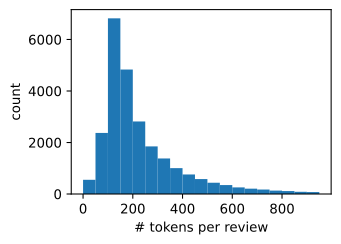
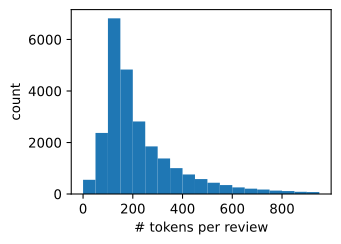
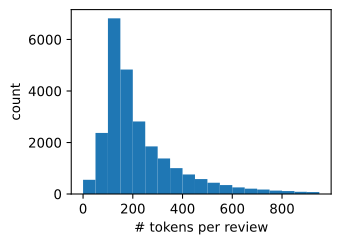
As we expected, the reviews have varying lengths. To process a minibatch of such reviews at each time, we set the length of each review to 500 with truncation and padding, which is similar to the preprocessing step for the machine translation dataset in Section 10.5.
num_steps = 500  # sequence length
train_features = d2l.tensor([d2l.truncate_pad(
    vocab[line], num_steps, vocab['<pad>']) for line in train_tokens])
print(train_features.shape)torch.Size([25000, 500])(25000, 500)(25000, 500)16.1.3 Creating Data Iterators
Now we can create data iterators. At each iteration, a minibatch of examples are returned.
train_iter = d2l.load_array((train_features, torch.tensor(train_data[1])), 64)

for X, y in train_iter:
    print('X:', X.shape, ', y:', y.shape)
    break
print('# batches:', len(train_iter))
X: torch.Size([64, 500]) , y: torch.Size([64])
# batches: 391train_iter = d2l.load_array((train_features, jnp.array(train_data[1])), 64)
for X, y in train_iter:
print('X:', X.shape, ', y:', y.shape)
break
print('# batches:', len(train_iter))X: (64, 500) , y: (64,)
# batches: 391train_iter = d2l.load_array((train_features, train_data[1]), 64)
for X, y in train_iter:
print('X:', X.shape, ', y:', y.shape)
break
print('# batches:', len(train_iter))X: (64, 500) , y: (64,)
# batches: 39116.1.4 Putting It All Together
Last, we wrap up the above steps into the load_data_imdb function. It returns training and test data iterators and the vocabulary of the IMDb review dataset.
def load_data_imdb(batch_size, num_steps=500):
    """Return data iterators and the vocabulary of the IMDb review dataset."""
    data_dir = d2l.download_extract('aclImdb', 'aclImdb')
    train_data = read_imdb(data_dir, True)
    test_data = read_imdb(data_dir, False)
    train_tokens = d2l.tokenize(train_data[0], token='word')
    test_tokens = d2l.tokenize(test_data[0], token='word')
    vocab = d2l.Vocab(train_tokens, min_freq=5)
    train_features = torch.tensor([d2l.truncate_pad(
        vocab[line], num_steps, vocab['<pad>']) for line in train_tokens])
    test_features = torch.tensor([d2l.truncate_pad(
        vocab[line], num_steps, vocab['<pad>']) for line in test_tokens])
    train_iter = d2l.load_array((train_features, torch.tensor(train_data[1])),
                                batch_size)
    test_iter = d2l.load_array((test_features, torch.tensor(test_data[1])),
                               batch_size,
                               is_train=False)
    return train_iter, test_iter, vocab
def load_data_imdb(batch_size, num_steps=500):
    """Return data iterators and the vocabulary of the IMDb review dataset."""
    data_dir = d2l.download_extract('aclImdb', 'aclImdb')
    train_data = read_imdb(data_dir, True)
    test_data = read_imdb(data_dir, False)
    train_tokens = d2l.tokenize(train_data[0], token='word')
    test_tokens = d2l.tokenize(test_data[0], token='word')
    vocab = d2l.Vocab(train_tokens, min_freq=5)
    train_features = jnp.array([d2l.truncate_pad(
        vocab[line], num_steps, vocab['<pad>']) for line in train_tokens])
    test_features = jnp.array([d2l.truncate_pad(
        vocab[line], num_steps, vocab['<pad>']) for line in test_tokens])
    train_iter = d2l.load_array((train_features, jnp.array(train_data[1])),
                                batch_size)
    test_iter = d2l.load_array((test_features, jnp.array(test_data[1])),
                               batch_size,
                               is_train=False)
    return train_iter, test_iter, vocab
def load_data_imdb(batch_size, num_steps=500):
    """Return data iterators and the vocabulary of the IMDb review dataset."""
    data_dir = d2l.download_extract('aclImdb', 'aclImdb')
    train_data = read_imdb(data_dir, True)
    test_data = read_imdb(data_dir, False)
    train_tokens = d2l.tokenize(train_data[0], token='word')
    test_tokens = d2l.tokenize(test_data[0], token='word')
    vocab = d2l.Vocab(train_tokens, min_freq=5)
    train_features = np.array([d2l.truncate_pad(
        vocab[line], num_steps, vocab['<pad>']) for line in train_tokens])
    test_features = np.array([d2l.truncate_pad(
        vocab[line], num_steps, vocab['<pad>']) for line in test_tokens])
    train_iter = d2l.load_array((train_features, train_data[1]), batch_size)
    test_iter = d2l.load_array((test_features, test_data[1]), batch_size,
                               is_train=False)
    return train_iter, test_iter, vocab
16.1.5 Summary
- Sentiment analysis studies people’s sentiments in their produced text, which is considered as a text classification problem that transforms a varying-length text sequence into a fixed-length text category.
- After preprocessing, we can load Stanford’s large movie review dataset (IMDb review dataset) into data iterators with a vocabulary.
16.1.6 Exercises
- What hyperparameters in this section can we modify to accelerate training sentiment analysis models?
- Can you implement a function to load the dataset of Amazon reviews into data iterators and labels for sentiment analysis?