from d2l import torch as d2l
import torch13.3 Automatic Parallelism
Deep learning frameworks (e.g., MXNet, PyTorch, and JAX) automatically construct computational graphs at the backend. Using a computational graph, the system is aware of all the dependencies, and can selectively execute multiple non-interdependent tasks in parallel to improve speed. For instance, Figure 13.2.2 in Section 13.2 initializes two variables independently. Consequently the system can choose to execute them in parallel.
Typically, a single operator will use all the computational resources on all CPUs or on a single GPU. For example, the dot operator will use all cores (and threads) on all CPUs, even if there are multiple CPU processors on a single machine. The same applies to a single GPU. Hence parallelization is not quite so useful for single-device computers. With multiple devices things matter more. While parallelization is typically most relevant between multiple GPUs, adding the local CPU will increase performance slightly. For example, see Hadjis et al. (2016) that focuses on training computer vision models combining a GPU and a CPU. With the convenience of an automatically parallelizing framework we can accomplish the same goal in a few lines of Python code. More broadly, our discussion of automatic parallel computation focuses on parallel computation using both CPUs and GPUs, as well as the parallelization of computation and communication.
Note that we need at least two GPUs to run the experiments in this section.
from d2l import jax as d2l
import jax
from jax import numpy as jnp
from d2l import mxnet as d2l
from mxnet import np, npx
npx.set_np()13.3.1 Parallel Computation on GPUs
Let’s start by defining a reference workload to test: the run function below performs 10 matrix-matrix multiplications on the device of our choice using data allocated into two variables: x_gpu1 and x_gpu2.
devices = d2l.try_all_gpus()
def run(x):
    return [x.mm(x) for _ in range(50)]

x_gpu1 = torch.rand(size=(4000, 4000), device=devices[0])
x_gpu2 = torch.rand(size=(4000, 4000), device=devices[1])
devices = jax.devices('gpu')
def run(x):
return [jnp.dot(x, x) for _ in range(50)]
x_gpu1 = jax.device_put(jax.random.normal(jax.random.PRNGKey(0), (4000, 4000)),
devices[0])
x_gpu2 = jax.device_put(jax.random.normal(jax.random.PRNGKey(1), (4000, 4000)),
devices[1])devices = d2l.try_all_gpus()
def run(x):
return [x.dot(x) for _ in range(50)]
x_gpu1 = np.random.uniform(size=(4000, 4000), ctx=devices[0])
x_gpu2 = np.random.uniform(size=(4000, 4000), ctx=devices[1])Now we apply the function to the data. To ensure that caching does not play a role in the results we warm up the devices by performing a single pass on either of them prior to measuring. torch.cuda.synchronize() waits for all kernels in all streams on a CUDA device to complete. It takes in a device argument, the device for which we need to synchronize. It uses the current device, given by current_device(), if the device argument is None (default).
Now we apply the function to the data. To ensure that caching does not play a role in the results we warm up the devices by performing a single pass on either of them prior to measuring. In JAX, computations are dispatched asynchronously. We call block_until_ready() on the result to wait for the computation to complete before taking a timing measurement.
Now we apply the function to the data. To ensure that caching does not play a role in the results we warm up the devices by performing a single pass on either of them prior to measuring.
run(x_gpu1)
run(x_gpu2)  # Warm-up all devices
torch.cuda.synchronize(devices[0])
torch.cuda.synchronize(devices[1])

with d2l.Benchmark('GPU1 time'):
    run(x_gpu1)
    torch.cuda.synchronize(devices[0])

with d2l.Benchmark('GPU2 time'):
    run(x_gpu2)
    torch.cuda.synchronize(devices[1])
GPU1 time: 0.1219 sec
GPU2 time: 0.1218 secrun(x_gpu1)[-1].block_until_ready() # Warm-up both devices
run(x_gpu2)[-1].block_until_ready()
with d2l.Benchmark('GPU1 time'):
run(x_gpu1)[-1].block_until_ready()
with d2l.Benchmark('GPU2 time'):
run(x_gpu2)[-1].block_until_ready()GPU1 time: 0.0783 sec
GPU2 time: 0.0804 secrun(x_gpu1) # Warm-up both devices
run(x_gpu2)
npx.waitall()
with d2l.Benchmark('GPU1 time'):
run(x_gpu1)
npx.waitall()
with d2l.Benchmark('GPU2 time'):
run(x_gpu2)
npx.waitall()GPU1 time: 0.1318 sec
GPU2 time: 0.1318 secIf we remove the synchronize statement between both tasks the system is free to parallelize computation on both devices automatically.
If we remove the block_until_ready call between both tasks the system is free to parallelize computation on both devices automatically.
If we remove the waitall statement between both tasks the system is free to parallelize computation on both devices automatically.
with d2l.Benchmark('GPU1 & GPU2'):
    run(x_gpu1)
    run(x_gpu2)
    torch.cuda.synchronize()
GPU1 & GPU2: 0.1207 secwith d2l.Benchmark('GPU1 & GPU2'):
run(x_gpu1)
run(x_gpu2)[-1].block_until_ready()GPU1 & GPU2: 0.1092 secwith d2l.Benchmark('GPU1 & GPU2'):
run(x_gpu1)
run(x_gpu2)
npx.waitall()GPU1 & GPU2: 0.1336 secIn the above case the total execution time is less than the sum of its parts, since the deep learning framework automatically schedules computation on both GPU devices without the need for sophisticated code on behalf of the user.
13.3.2 Parallel Computation and Communication
In many cases we need to move data between different devices, say between the CPU and GPU, or between different GPUs. For instance, this occurs when we want to perform distributed optimization where we need to aggregate the gradients over multiple accelerator cards. Let’s simulate this by computing on the GPU and then copying the results back to the CPU.
def copy_to_cpu(x, non_blocking=False):
    return [y.to('cpu', non_blocking=non_blocking) for y in x]

with d2l.Benchmark('Run on GPU1'):
    y = run(x_gpu1)
    torch.cuda.synchronize()

with d2l.Benchmark('Copy to CPU'):
    y_cpu = copy_to_cpu(y)
    torch.cuda.synchronize()
Run on GPU1: 0.1210 secCopy to CPU: 2.1617 secdef copy_to_cpu(x):
return [jax.device_put(y, jax.devices('cpu')[0]) for y in x]
with d2l.Benchmark('Run on GPU1'):
y = run(x_gpu1)
y[-1].block_until_ready()
with d2l.Benchmark('Copy to CPU'):
y_cpu = copy_to_cpu(y)
y_cpu[-1].block_until_ready()Run on GPU1: 0.0783 secCopy to CPU: 0.9584 secdef copy_to_cpu(x):
return [y.copyto(npx.cpu()) for y in x]
with d2l.Benchmark('Run on GPU1'):
y = run(x_gpu1)
npx.waitall()
with d2l.Benchmark('Copy to CPU'):
y_cpu = copy_to_cpu(y)
npx.waitall()Run on GPU1: 0.1414 secCopy to CPU: 2.2114 secThis is somewhat inefficient. Note that we could already start copying parts of y to the CPU while the remainder of the list is still being computed. This situation occurs, e.g., when we compute the (backprop) gradient on a minibatch. The gradients of some of the parameters will be available earlier than that of others. Hence it works to our advantage to start using PCI-Express bus bandwidth while the GPU is still running. In PyTorch, several functions such as to() and copy_() admit an explicit non_blocking argument, which lets the caller bypass synchronization when it is unnecessary. Setting non_blocking=True allows us to simulate this scenario.
This is somewhat inefficient. Note that we could already start copying parts of y to the CPU while the remainder of the list is still being computed. This situation occurs, e.g., when we compute the (backprop) gradient on a minibatch. The gradients of some of the parameters will be available earlier than that of others. Hence it works to our advantage to start using PCI-Express bus bandwidth while the GPU is still running. In JAX, jax.device_put dispatches the transfer asynchronously and returns immediately. By deferring block_until_ready we allow computation and communication to overlap.
This is somewhat inefficient. Note that we could already start copying parts of y to the CPU while the remainder of the list is still being computed. This situation occurs, e.g., when we compute the gradient on a minibatch. The gradients of some of the parameters will be available earlier than that of others. Hence it works to our advantage to start using PCI-Express bus bandwidth while the GPU is still running. Removing waitall between both parts allows us to simulate this scenario.
with d2l.Benchmark('Run on GPU1 and copy to CPU'):
    y = run(x_gpu1)
    y_cpu = copy_to_cpu(y, True)
    torch.cuda.synchronize()
Run on GPU1 and copy to CPU: 3.0742 secwith d2l.Benchmark('Run on GPU1 and copy to CPU'):
y = run(x_gpu1)
y_cpu = copy_to_cpu(y)
y_cpu[-1].block_until_ready()Run on GPU1 and copy to CPU: 1.2576 secwith d2l.Benchmark('Run on GPU1 and copy to CPU'):
y = run(x_gpu1)
y_cpu = copy_to_cpu(y)
npx.waitall()Run on GPU1 and copy to CPU: 2.7658 secThe total time required for both operations is (as expected) less than the sum of their parts. Note that this task is different from parallel computation as it uses a different resource: the bus between the CPU and GPUs. In fact, we could compute on both devices and communicate, all at the same time. As noted above, there is a dependency between computation and communication: y[i] must be computed before it can be copied to the CPU. Fortunately, the system can copy y[i-1] while computing y[i] to reduce the total running time.
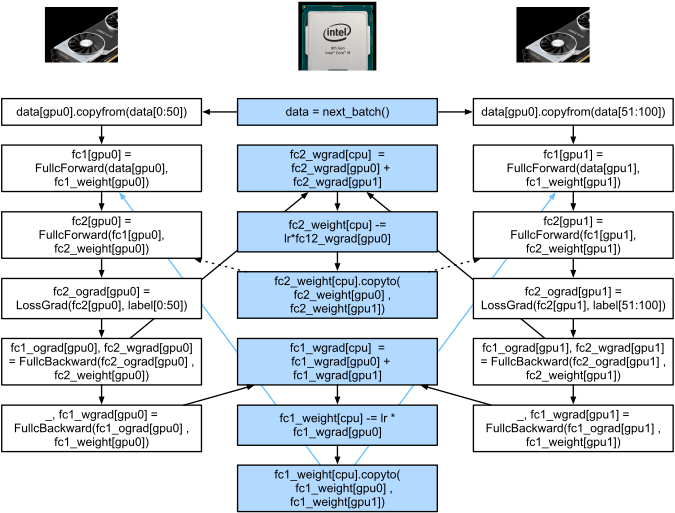
We conclude with an illustration of the computational graph and its dependencies for a simple two-layer MLP when training on a CPU and two GPUs, as depicted in Figure 13.3.1. It would be quite painful to schedule the parallel program resulting from this manually. This is where it is advantageous to have a graph-based computing backend for optimization.
13.3.3 Summary
- Modern systems have a variety of devices, such as multiple GPUs and CPUs. They can be used in parallel, asynchronously.
- Modern systems also have a variety of resources for communication, such as PCI Express, storage (typically solid-state drives or via networks), and network bandwidth. They can be used in parallel for peak efficiency.
- The backend can improve performance through automatic parallel computation and communication.
13.3.4 Exercises
- Eight operations were performed in the
runfunction defined in this section. There are no dependencies between them. Design an experiment to see if the deep learning framework will automatically execute them in parallel. - When the workload of an individual operator is sufficiently small, parallelization can help even on a single CPU or GPU. Design an experiment to verify this.
- Design an experiment that uses parallel computation on CPUs, GPUs, and communication between both devices.
- Use a debugger such as NVIDIA’s Nsight to verify that your code is efficient.
- Designing computation tasks that include more complex data dependencies, and run experiments to see if you can obtain the correct results while improving performance.