from d2l import torch as d2l
import numpy as np
import torch
from torch import nn3.5 Concise Implementation of Linear Regression
Deep learning has witnessed a sort of Cambrian explosion over the past decade. The sheer number of techniques, applications and algorithms by far surpasses the progress of previous decades. This is due to a fortuitous combination of multiple factors, one of which is the powerful free tools offered by a number of open-source deep learning frameworks. Theano (Bergstra et al. 2010), DistBelief (Dean et al. 2012), and Caffe (Jia et al. 2014) arguably represent the first generation of such models that found widespread adoption. In contrast to earlier (seminal) works like SN2 (Simulateur Neuristique) (Bottou and Le Cun 1988), which provided a Lisp-like programming experience, modern frameworks offer automatic differentiation and the convenience of Python. These frameworks allow us to automate and modularize the repetitive work of implementing gradient-based learning algorithms.
In Section 3.4, we relied only on (i) tensors for data storage and linear algebra; and (ii) automatic differentiation for calculating gradients. In practice, because data iterators, loss functions, optimizers, and neural network layers are so common, modern libraries implement these components for us as well. In this section, we will show you how to implement the linear regression model from Section 3.4 concisely by using high-level APIs of deep learning frameworks.
from d2l import tensorflow as d2l
import numpy as np
import tensorflow as tf
from d2l import jax as d2l
from flax import linen as nn
import jax
from jax import numpy as jnp
import optaxfrom d2l import mxnet as d2l
from mxnet import autograd, gluon, init, np, npx
from mxnet.gluon import nn
npx.set_np()3.5.1 Defining the Model
When we implemented linear regression from scratch in Section 3.4, we defined our model parameters explicitly and coded up the calculations to produce output using basic linear algebra operations. You should know how to do this. But once your models get more complex, and once you have to do this nearly every day, you will be glad of the assistance. The situation is similar to coding up your own blog from scratch. Doing it once or twice is rewarding and instructive, but you would be a lousy web developer if you spent a month reinventing the wheel.
For standard operations, we can use a framework’s predefined layers, which allow us to focus on the layers used to construct the model rather than worrying about their implementation. Recall the architecture of a single-layer network as described in Figure 3.1.2. The layer is called fully connected, since each of its inputs is connected to each of its outputs by means of a matrix–vector multiplication.
In PyTorch, the fully connected layer is defined in Linear and LazyLinear classes (available since version 1.8.0). The latter allows users to specify merely the output dimension, while the former additionally asks for how many inputs go into this layer. Specifying input shapes is inconvenient and may require nontrivial calculations (such as in convolutional layers). Thus, for simplicity, we will use such “lazy” layers whenever we can.
In Keras, the fully connected layer is defined in the Dense class. Since we only want to generate a single scalar output, we set that number to 1. It is worth noting that, for convenience, Keras does not require us to specify the input shape for each layer. We do not need to tell Keras how many inputs go into this linear layer. When we first try to pass data through our model, e.g., when we execute net(X) later, Keras will automatically infer the number of inputs to each layer. We will describe how this works in more detail later.
In Gluon, the fully connected layer is defined in the Dense class. Since we only want to generate a single scalar output, we set that number to 1. It is worth noting that, for convenience, Gluon does not require us to specify the input shape for each layer. Hence we do not need to tell Gluon how many inputs go into this linear layer. When we first pass data through our model, e.g., when we execute net(X) later, Gluon will automatically infer the number of inputs to each layer and thus instantiate the correct model. We will describe how this works in more detail later.
class LinearRegression(d2l.Module):
    """The linear regression model implemented with high-level APIs."""
    def __init__(self, lr):
        super().__init__()
        self.save_hyperparameters()
        self.net = nn.LazyLinear(1)
        self.net.weight.data.normal_(0, 0.01)
        self.net.bias.data.fill_(0)
class LinearRegression(d2l.Module):
"""The linear regression model implemented with high-level APIs."""
def __init__(self, lr):
super().__init__()
self.save_hyperparameters()
initializer = tf.initializers.RandomNormal(stddev=0.01)
self.net = tf.keras.layers.Dense(1, kernel_initializer=initializer)class LinearRegression(d2l.Module):
"""The linear regression model implemented with high-level APIs."""
lr: float
def setup(self):
self.net = nn.Dense(1, kernel_init=nn.initializers.normal(0.01))class LinearRegression(d2l.Module):
"""The linear regression model implemented with high-level APIs."""
def __init__(self, lr):
super().__init__()
self.save_hyperparameters()
self.net = nn.Dense(1)
self.net.initialize(init.Normal(sigma=0.01))In the forward method we just invoke the built-in __call__ method of the predefined layers to compute the outputs.
@d2l.add_to_class(LinearRegression)
def forward(self, X):
return self.net(X)@d2l.add_to_class(LinearRegression)
def forward(self, X):
return self.net(X)@d2l.add_to_class(LinearRegression)
def forward(self, X):
return self.net(X)@d2l.add_to_class(LinearRegression)
def forward(self, X):
return self.net(X)3.5.2 Defining the Loss Function
The MSELoss class computes the mean squared error (without the \(1/2\) factor in Equation 3.1.4). By default, MSELoss returns the average loss over examples. It is faster (and easier to use) than implementing our own.
The MeanSquaredError class computes the mean squared error (without the \(1/2\) factor in Equation 3.1.4). By default, it returns the average loss over examples.
The loss module defines many useful loss functions. For speed and convenience, we forgo implementing our own and choose the built-in loss.L2Loss instead. Because the loss that it returns is the squared error for each example, we use meanto average the loss across over the minibatch.
@d2l.add_to_class(LinearRegression)
def loss(self, y_hat, y):
    fn = nn.MSELoss()
return fn(y_hat, y)@d2l.add_to_class(LinearRegression)
def loss(self, y_hat, y):
fn = tf.keras.losses.MeanSquaredError()
return fn(y, y_hat)@d2l.add_to_class(LinearRegression)
def loss(self, params, X, y, state):
y_hat = state.apply_fn({'params': params}, *X)
return d2l.reduce_mean(jnp.square(y_hat - y))@d2l.add_to_class(LinearRegression)
def loss(self, y_hat, y):
fn = gluon.loss.L2Loss()
return 2 * fn(y_hat, y).mean()3.5.3 Defining the Optimization Algorithm
Minibatch SGD is a standard tool for optimizing neural networks and thus PyTorch supports it alongside a number of variations on this algorithm in the optim module. When we instantiate an SGD instance, we specify the parameters to optimize over, obtainable from our model via self.parameters(), and the learning rate (self.lr) required by our optimization algorithm.
Minibatch SGD is a standard tool for optimizing neural networks and thus Keras supports it alongside a number of variations on this algorithm in the optimizers module.
Minibatch SGD is a standard tool for optimizing neural networks and thus Gluon supports it alongside a number of variations on this algorithm through its Trainer class. Note that Gluon’s Trainer class stands for the optimization algorithm, while the Trainer class we created in Section 3.2 contains the training method, i.e., repeatedly call the optimizer to update the model parameters. When we instantiate Trainer, we specify the parameters to optimize over, obtainable from our model net via net.collect_params(), the optimization algorithm we wish to use (sgd), and a dictionary of hyperparameters required by our optimization algorithm.
@d2l.add_to_class(LinearRegression)
def configure_optimizers(self):
return torch.optim.SGD(self.parameters(), self.lr)@d2l.add_to_class(LinearRegression)
def configure_optimizers(self):
return tf.keras.optimizers.SGD(self.lr)@d2l.add_to_class(LinearRegression)
def configure_optimizers(self):
return optax.sgd(self.lr)@d2l.add_to_class(LinearRegression)
def configure_optimizers(self):
return gluon.Trainer(self.collect_params(),
'sgd', {'learning_rate': self.lr})3.5.4 Training
You might have noticed that expressing our model through high-level APIs of a deep learning framework requires fewer lines of code. We did not have to allocate parameters individually, define our loss function, or implement minibatch SGD. Once we start working with much more complex models, the advantages of the high-level API will grow considerably.
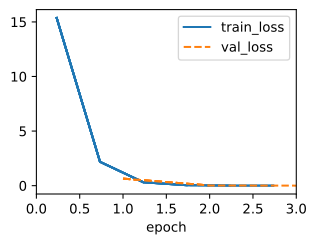
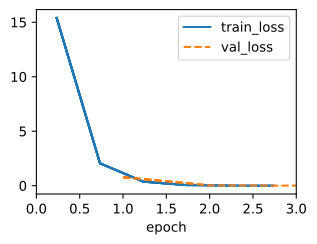
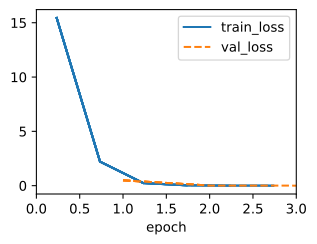
Now that we have all the basic pieces in place, the training loop itself is the same as the one we implemented from scratch. So we just call the fit method (introduced in Section 3.2.4), which relies on the implementation of the fit_epoch method in Section 3.4, to train our model.
model = LinearRegression(lr=0.03)
data = d2l.SyntheticRegressionData(w=d2l.tensor([2, -3.4]), b=4.2)
trainer = d2l.Trainer(max_epochs=3)
trainer.fit(model, data)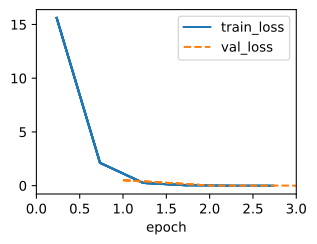
Below, we compare the model parameters learned by training on finite data and the actual parameters that generated our dataset. To access parameters, we access the weights and bias of the layer that we need. As in our implementation from scratch, note that our estimated parameters are close to their true counterparts.
@d2l.add_to_class(LinearRegression)
def get_w_b(self):
    return (self.net.weight.data, self.net.bias.data)
w, b = model.get_w_b()@d2l.add_to_class(LinearRegression)
def get_w_b(self):
return (self.get_weights()[0], self.get_weights()[1])
w, b = model.get_w_b()@d2l.add_to_class(LinearRegression)
def get_w_b(self, state):
net = state.params['net']
return net['kernel'], net['bias']
w, b = model.get_w_b(trainer.state)@d2l.add_to_class(LinearRegression)
def get_w_b(self):
return (self.net.weight.data(), self.net.bias.data())
w, b = model.get_w_b()print(f'error in estimating w: {data.w - d2l.reshape(w, data.w.shape)}')
print(f'error in estimating b: {data.b - b}')error in estimating w: tensor([ 0.0017, -0.0067])
error in estimating b: tensor([0.0084])error in estimating w: [ 0.00251853 -0.01141524]
error in estimating b: [0.01093817]error in estimating w: [ 0.01097143 -0.00891733]
error in estimating b: [0.0170331]error in estimating w: [ 0.00543392 -0.00346494]
error in estimating b: [0.00819731]3.5.5 Summary
This section contains the first implementation of a deep network (in this book) to tap into the conveniences afforded by modern deep learning frameworks, such as MXNet (Chen et al. 2015), JAX (Frostig et al. 2018), PyTorch (Paszke et al. 2019), and Tensorflow (Abadi et al. 2016). We used framework defaults for loading data, defining a layer, a loss function, an optimizer and a training loop. Whenever the framework provides all necessary features, it is generally a good idea to use them, since the library implementations of these components tend to be heavily optimized for performance and properly tested for reliability. At the same time, try not to forget that these modules can be implemented directly. This is especially important for aspiring researchers who wish to live on the leading edge of model development, where you will be inventing new components that cannot possibly exist in any current library.
In PyTorch, the data module provides tools for data processing, the nn module defines a large number of neural network layers and common loss functions. We can initialize the parameters by replacing their values with methods ending with _. Note that we need to specify the input dimensions of the network. While this is trivial for now, it can have significant knock-on effects when we want to design complex networks with many layers. Careful considerations of how to parametrize these networks is needed to allow portability.
In TensorFlow, the data module provides tools for data processing, the keras module defines a large number of neural network layers and common loss functions. Moreover, the initializers module provides various methods for model parameter initialization. Dimensionality and storage for networks are automatically inferred (but be careful not to attempt to access parameters before they have been initialized).
In Gluon, the data module provides tools for data processing, the nn module defines a large number of neural network layers, and the loss module defines many common loss functions. Moreover, the initializer gives access to many choices for parameter initialization. Conveniently for the user, dimensionality and storage are automatically inferred. A consequence of this lazy initialization is that you must not attempt to access parameters before they have been instantiated (and initialized).
3.5.6 Exercises
- How would you need to change the learning rate if you replace the aggregate loss over the minibatch with an average over the loss on the minibatch?
- Review the framework documentation to see which loss functions are provided. In particular, replace the squared loss with Huber’s robust loss function. That is, use the loss function \[l(y,y') = \begin{cases}|y-y'| -\frac{\sigma}{2} & \textrm{ if } |y-y'| > \sigma \\ \frac{1}{2 \sigma} (y-y')^2 & \textrm{ otherwise}\end{cases} \tag{3.5.1}\]
- How do you access the gradient of the weights of the model?
- What is the effect on the solution if you change the learning rate and the number of epochs? Does it keep on improving?
- How does the solution change as you vary the amount of data generated?
- Plot the estimation error for \(\hat{\mathbf{w}} - \mathbf{w}\) and \(\hat{b} - b\) as a function of the amount of data. Hint: increase the amount of data logarithmically rather than linearly, i.e., 5, 10, 20, 50, …, 10,000 rather than 1000, 2000, …, 10,000.
- Why is the suggestion in the hint appropriate?